 PRACXA
Online proctoring
Online Proctoring That Supports Fair Review
Configure proportionate exam controls, follow live activity and review security evidence without treating every alert as automatic proof.
Assessment workspace
Core capabilities
Everything your assessment team needs to move forward
Live exam monitoring
See attempt status, progress, connectivity and security activity in one view.
Evidence review
Review configured camera and screen evidence with a clear audit trail.
Browser safeguards
Detect tab switches and restrict copy, paste and conflicting sessions where configured.
A closer look
Know what to check before, during and after an exam.
Choose the controls your exam needs and explain them to candidates. Give your team a clear way to follow attempts and review issues.
Before: explain the rules
Tell candidates which device, camera and screen permissions they need. Ask them to read the instructions and complete required checks.
During: watch progress and alerts
Check who is active, disconnected or finished. View live camera streams when enabled and review security events that need attention.
After: look at the evidence
Open available recordings, snapshots and screen evidence. Consider the timing and circumstances before deciding what an alert means.
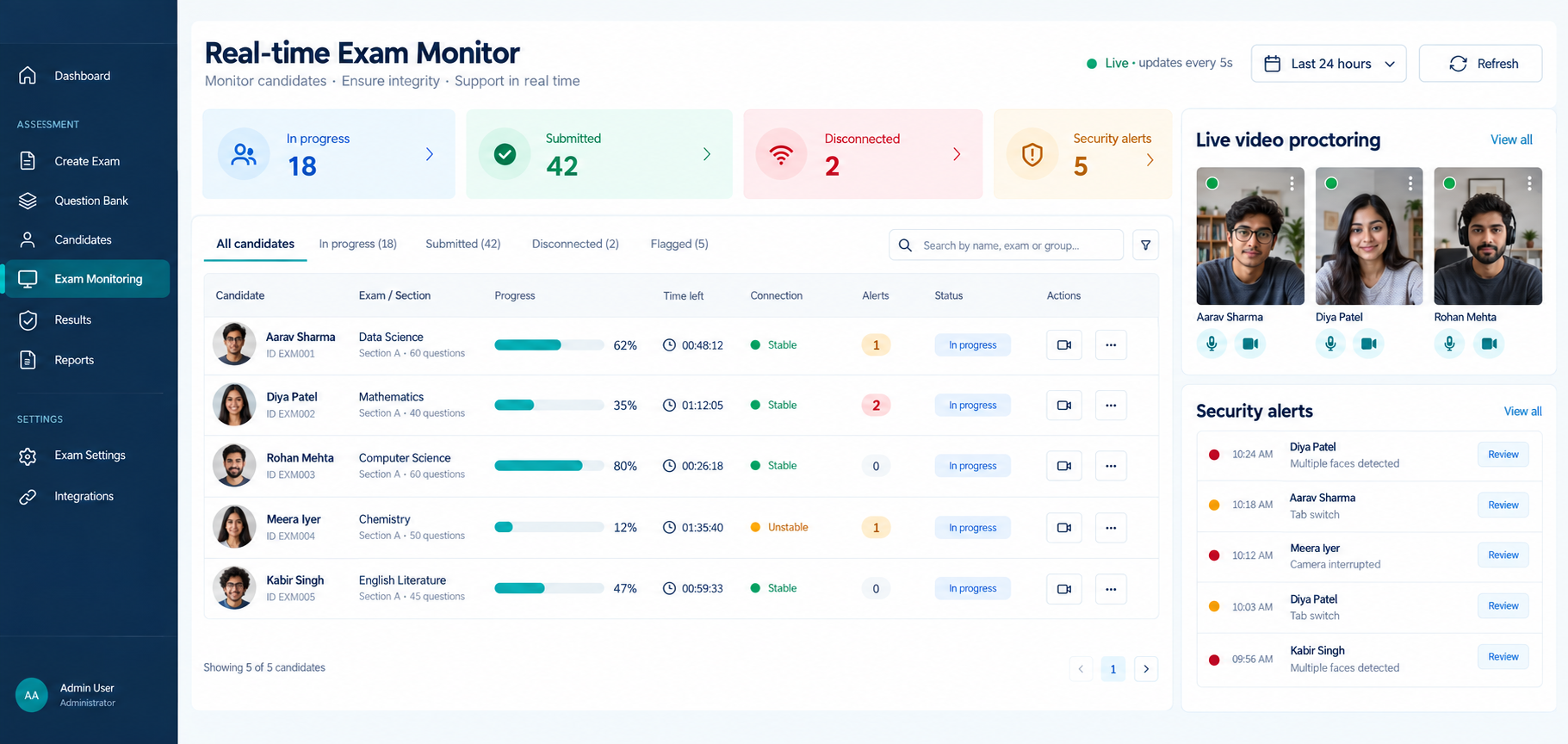
Example, not a customer case study
A candidate loses their connection
Here is one way your team could use Pracxa.
See exam monitoring- 1
The monitor shows a change in connection or attempt status.
- 2
Check the attempt details and events around the interruption.
- 3
Apply the exam’s recovery rules and permitted instructor actions.
- 4
Review the record before making any decision about the attempt.
A connected workflow
A practical security workflow
- 1
Set the policy
Choose controls that match the importance and risk of the exam.
- 2
Prepare candidates
Share rules and complete a system check before the attempt.
- 3
Monitor
Follow live signals and help candidates recover from genuine interruptions.
- 4
Review fairly
Evaluate alerts with their timing, evidence and wider exam context.
Built for real organisations
Controls for remote examination programmes
Use security options for entrance exams, recruitment assessments, certifications and other higher-stakes remote exams.
Explore related capabilities
Continue your product tour
Frequently asked questions
Helpful answers before you begin
What does online proctoring record? +
The exact evidence depends on the controls enabled for an exam. Pracxa can support security events and configured camera or screen evidence for authorised review.
Does a security alert prove misconduct? +
No. Alerts are signals that should be reviewed in context by an authorised person according to the organisation’s policy.
Is live video the same as recorded evidence? +
No. Live video helps you watch an active attempt. Recordings and snapshots are evidence you can open later when capture was enabled and the files are available.
Can browser controls prevent all cheating? +
No. Browser controls have limits and cannot control every off-device action. Use them alongside clear rules and human review.
What should candidates know before a monitored exam? +
Explain device needs, permissions, what is recorded and your organisation’s privacy and review rules before the exam.
Start with Pracxa
Run your next online assessment with more clarity.
Start on the free plan or talk through your assessment workflow with our team.